DataKook HLD: Enterprise-Grade Security Architecture on Azure
Security teams don't just ask "what does the tool do?" — they ask "where does my data go, who can reach it, and how is it protected end to end?" DataKook is built to answer all three with the highest bar in mind. This high-level design (HLD) walks through the four pillars that make DataKook a truly enterprise-grade, high-security platform.
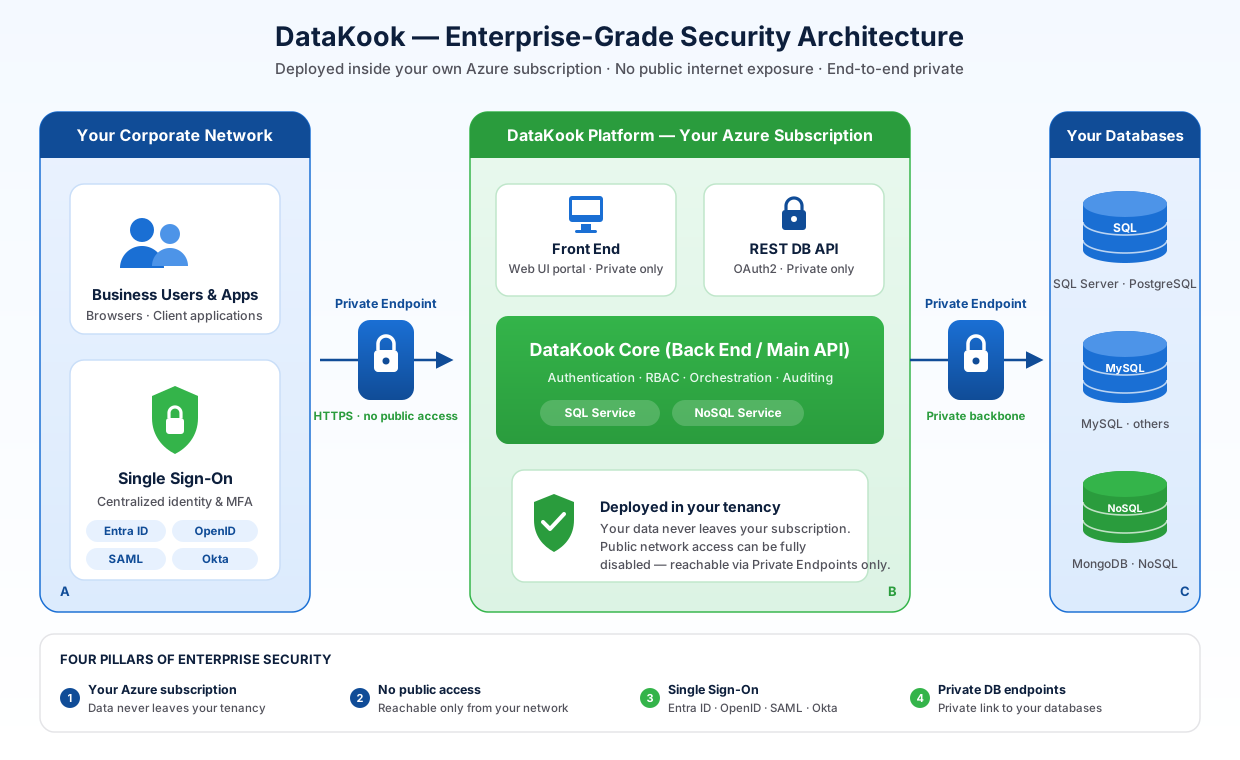
Security by Architecture, Not by Afterthought
Most data tools ask you to trust a vendor's cloud with your most sensitive asset — your databases. DataKook takes the opposite approach: the entire platform runs inside your own environment, locked down to your network, gated behind your identity provider, and connected to your databases over private links. Nothing about the security model relies on trusting a third-party SaaS boundary.
The design rests on four pillars:
- Deployed in your own Azure subscription — your data never leaves your tenancy.
- Private-only network access — reachable only from your corporate network, with zero public exposure.
- Single Sign-On (SSO) — authentication centralized in your existing identity provider.
- Private endpoint connectivity to your databases — DataKook reaches your data over Microsoft's private backbone, never the public internet.
Pillar 1 — Deployed in Your Own Azure Subscription
DataKook ships as an Azure Managed Application from the Azure Marketplace and is provisioned directly into your Azure subscription. There is no shared multi-tenant SaaS backend holding your data.
- Your data stays yours — every resource (App Services, PostgreSQL, storage) lives in a resource group you own.
- Your compliance boundary — data residency, region selection, and governance follow your existing Azure policies.
- Your control plane — you manage identity, networking, and security posture through the tools your team already uses.
Pillar 2 — Private-Only Access (No Public Exposure)
DataKook is composed of three web applications — the Front End (UI), the Back End (main API), and the REST DB API. Each can be locked down independently, and Azure Public Network Access offers three progressively stricter modes:
| Mode | Who can reach it | Typical use |
|---|---|---|
| Enabled from all networks | 🔴 Any IP on the public internet | Development & evaluation |
| Enabled from select IPs | 🟡 Whitelisted corporate / VPN IPs only | Restricted access |
| Disabled (Private only) | 🟢 Only via Azure Private Endpoints | Regulated production |
For the highest security tier, public access is completely disabled. The applications become reachable exclusively through Azure Private Endpoints inside your virtual network — meaning DataKook is accessible only from your corporate local network (or VPN), and is entirely invisible to the public internet.
Pillar 3 — Single Sign-On (SSO)
Authentication is delegated to your existing identity provider, so users never manage separate DataKook credentials and your security team keeps a single point of control. DataKook supports enterprise SSO standards including:
- OpenID Connect (OIDC) — modern token-based federation.
- SAML 2.0 — for enterprise IdPs and legacy SSO estates.
- Azure AD / Microsoft Entra ID — native integration with your Microsoft tenant.
- Okta — and other standards-compliant providers.
Because identity flows through your IdP, you retain full control over MFA enforcement, conditional access, group-based authorization, and user lifecycle (joiner/mover/leaver) — all governed centrally instead of in yet another tool.
Pillar 4 — Private Endpoint Connectivity to Your Databases
Locking down inbound access is only half the story. DataKook also secures the outbound path to your data. When your databases have public access disabled — as they should in a hardened environment — DataKook connects to them over private endpoints.
Instead of opening database firewalls to public IPs, you create a private link from DataKook directly to each database resource:
- Add a database endpoint and name it descriptively (e.g.
pe-datakook-to-sqlprod). - Select the database type (SQL Server, PostgreSQL, MySQL, etc.).
- Provide the database's Azure Resource ID and target sub-resource group.
- Approve the pending connection from the database's Networking blade.
Once approved, all traffic between DataKook and your databases flows entirely over Microsoft's private backbone network — never traversing the public internet. This keeps the full data path private, from user browser to database row.
End-to-End: The Full Secure Path
┌───────────────────┐   Private Endpoint    ┌────────────────────┐   Private Endpoint    ┌──────────────────┐
│  Corporate User   │──────(no public)─────▶│  DataKook (Your    │──────(no public)─────▶│  Your Databases  │
│  on local network │   + SSO (OIDC/SAML/   │  Azure Subscription)│   Microsoft private   │  (SQL, Postgres, │
│                   │      Entra ID/Okta)   │  Front/Back/REST DB │      backbone         │   MongoDB, MySQL)│
└───────────────────┘                       └────────────────────┘                       └──────────────────┘
        │                                              │                                          │
   Private VNet only                          Runs in your tenancy                        Private link only
   No internet exposure                       Your data never leaves                      No public firewall rules
Every hop is private, authenticated, and inside your control boundary. There is no point in the architecture where your data crosses a shared vendor cloud or the public internet.
Why This Matters for Regulated Industries
For financial services, healthcare, government, and any organization with strict data governance, this design checks the boxes auditors care about:
- Data sovereignty — everything stays in your subscription and chosen region.
- Zero public attack surface — no public endpoints to scan, probe, or exploit.
- Centralized identity & MFA — enforced through your IdP and conditional access.
- Private data path — no database exposed to the internet, ever.
- Full auditability — activity governed by your Azure and DataKook controls.
Getting Started
DataKook deploys from the Azure Marketplace as a managed application into your own subscription. From there, lock down public access, wire up SSO, and connect your databases over private endpoints. For a step-by-step guide, see the Azure Network Configuration documentation.