1. Overview
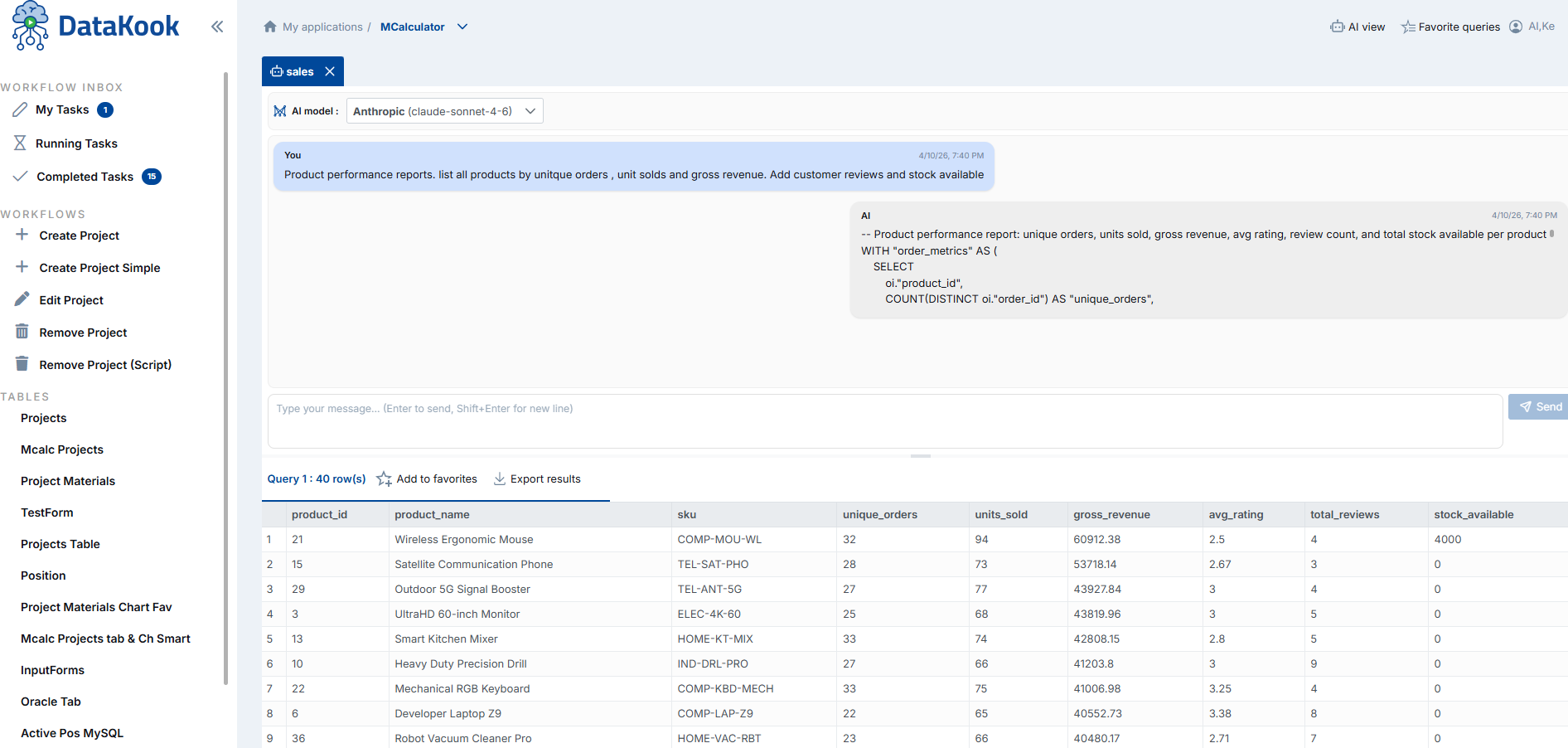
DataKook is fully integrated with Artificial Intelligence and offers a comprehensive suite of AI-powered features designed to transform the way teams interact with their databases. From generating complex SQL queries using plain English to providing an intelligent assistant that optimizes your existing queries, DataKook brings the full power of modern large language models (LLMs) directly into your database workflow.
Security-First Architecture — Your Data Stays Protected
The core principle behind DataKook's AI integration is security by design. Unlike traditional approaches where an AI model connects directly to your database — exposing connection strings, credentials, and raw data — DataKook acts as a secure intermediary bridge between the LLM and your databases.
Here is how this architecture works:
- No connection strings shared with the LLM — The AI model never receives or stores any database credentials. All connectivity is managed internally by DataKook's backend.
- No direct data access — The LLM cannot query, read, or modify your database tables directly. It only receives the metadata and context that DataKook explicitly provides in order to generate responses.
- Schema-aware, data-blind — DataKook shares your database schema (table names, column names, data types, and relationships) with the AI model so it can generate accurate SQL. However, the actual row-level data in your tables is never sent to the LLM.
- Query execution stays on your side — When the AI generates a SQL query, it is returned to DataKook and executed by the platform's own database engine using existing secure connections. The LLM is never in the execution path.
- Audit trail — Every AI-generated query is logged and can be reviewed through DataKook's audit capabilities, giving administrators full visibility into what the AI produced and what was actually executed.
This architecture means you benefit from the full power of AI — natural language understanding, intelligent query generation, performance optimization suggestions, and more — without compromising your organization's security posture, compliance requirements, or data governance policies.
Supported AI Providers
DataKook supports multiple AI providers, giving you the flexibility to choose the model and infrastructure that best fits your organization:
- OpenAI — Access GPT models directly via your OpenAI API key.
- Azure OpenAI — Use Azure-hosted OpenAI deployments for enterprises that require data residency, private networking, and Azure-managed compliance controls.
- Additional providers — Depending on your DataKook version, further AI providers may be available or added in future releases.
Who Benefits from AI Integration?
DataKook's AI features are designed for every role in your organization:
- Technical teams (developers, DBAs, data engineers) — Accelerate SQL authoring, debug and optimize existing queries, and reduce the time spent on repetitive database tasks.
- Business users (analysts, managers, product owners) — Query databases independently using natural language, generate quick insights, and create charts without writing a single line of SQL or relying on technical teams.
- Integration architects — Expose AI-powered database queries as secure REST APIs, enabling seamless integration with external AI agents, chatbots, and automation workflows.
2.1 Database Agentic AI Mode
The Database Agentic AI Mode transforms DataKook's AI from a single-query assistant into a fully autonomous database agent. Describe your entire multi-step database workflow in one natural language message, and the AI will plan, decompose, and execute each step autonomously — from querying data, to creating tables, to inserting records — with full safety controls at every stage.
How It Works
- Describe your full workflow in one message — Write multiple instructions in a single prompt. For example:
- "1- List products with stock levels below 10 by warehouse"
- "2- Create a new table called 'notification' with columns: product reference, date, and text message"
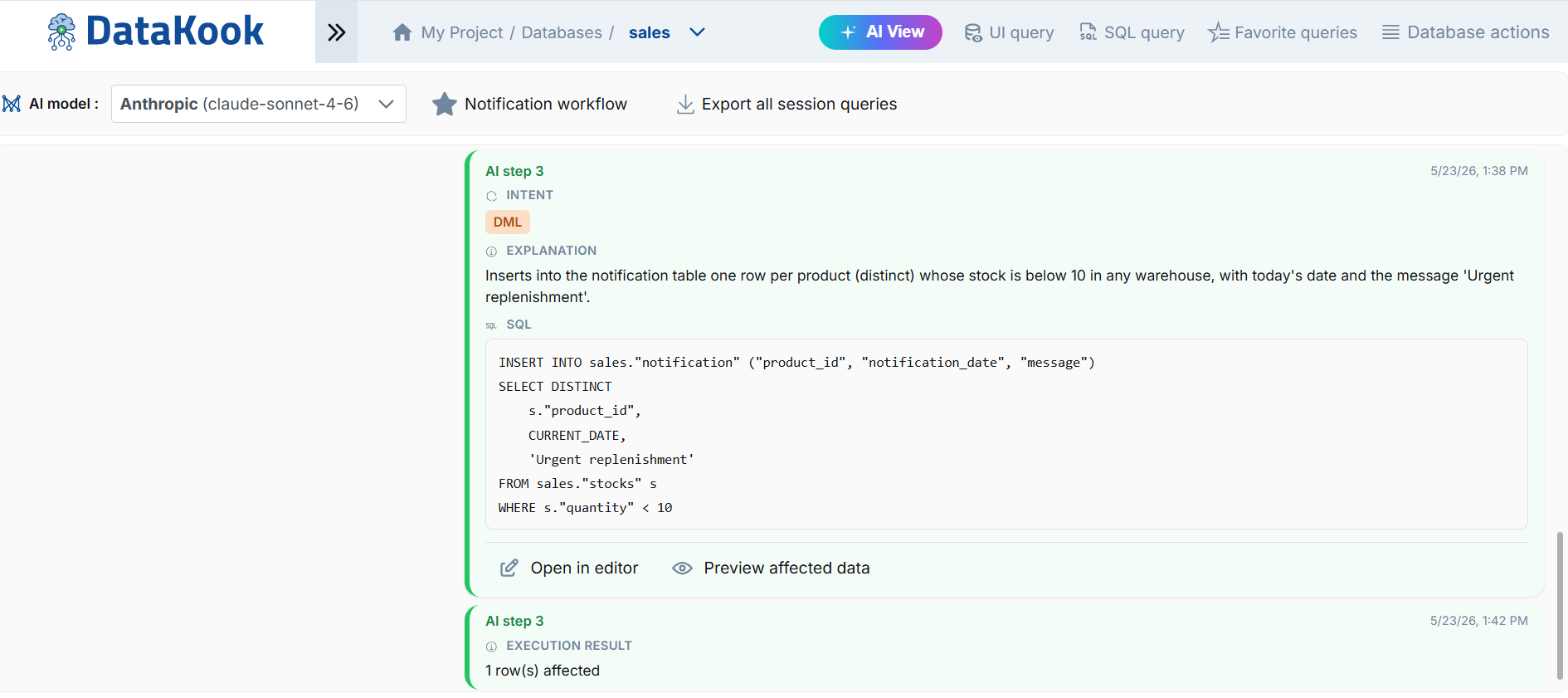
- "3- Insert into this new table the low-stock products with the status 'Urgent replenishment'"
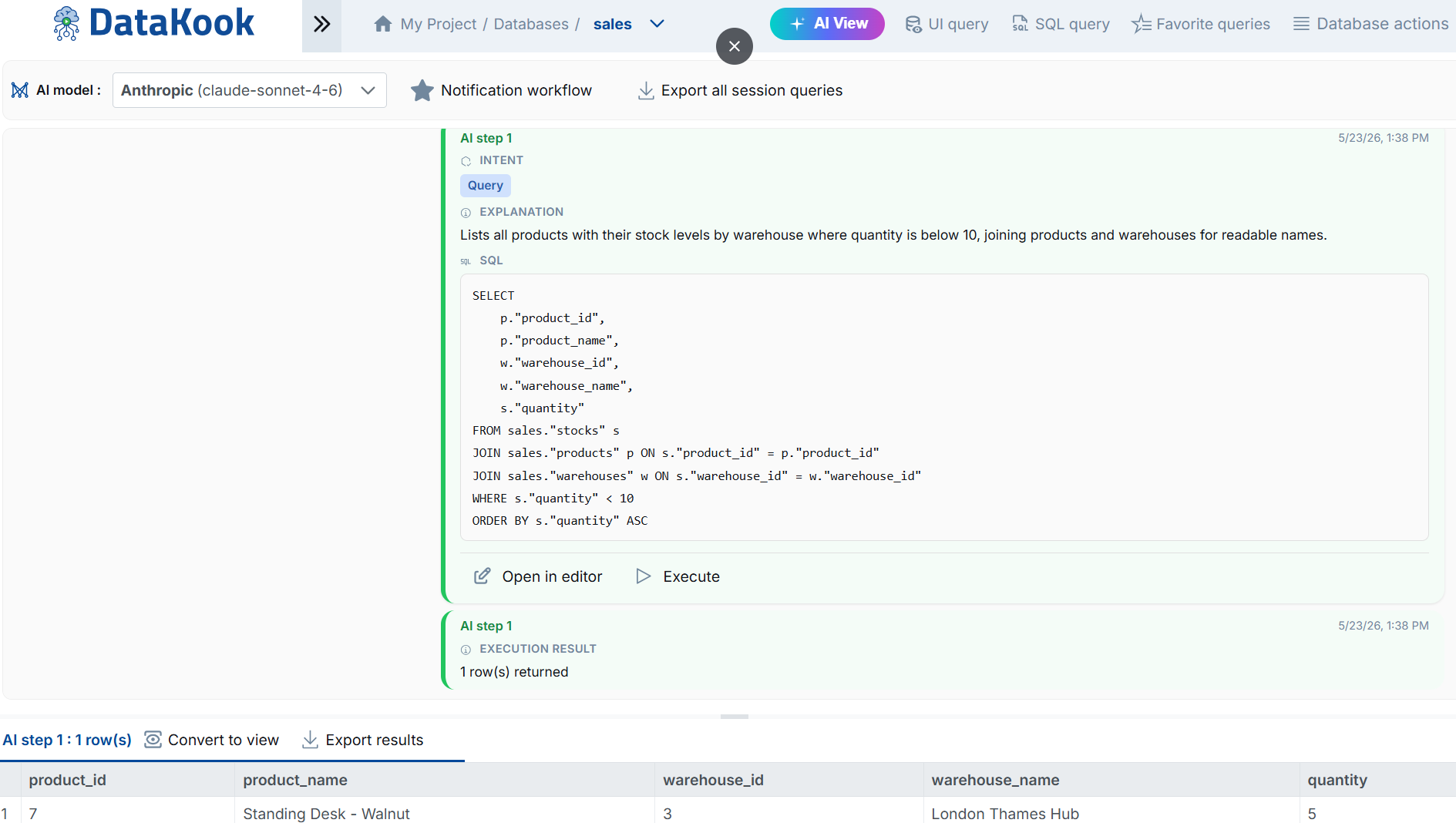
- The AI decomposes and plans — DataKook's AI agent breaks your request into individual steps, each classified by intent: Query, DDL (Data Definition Language), or DML (Data Manipulation Language).
- Step-by-step execution with explanations — Each step is displayed with its intent, a plain-language explanation, and the generated SQL. You can review every step before execution.
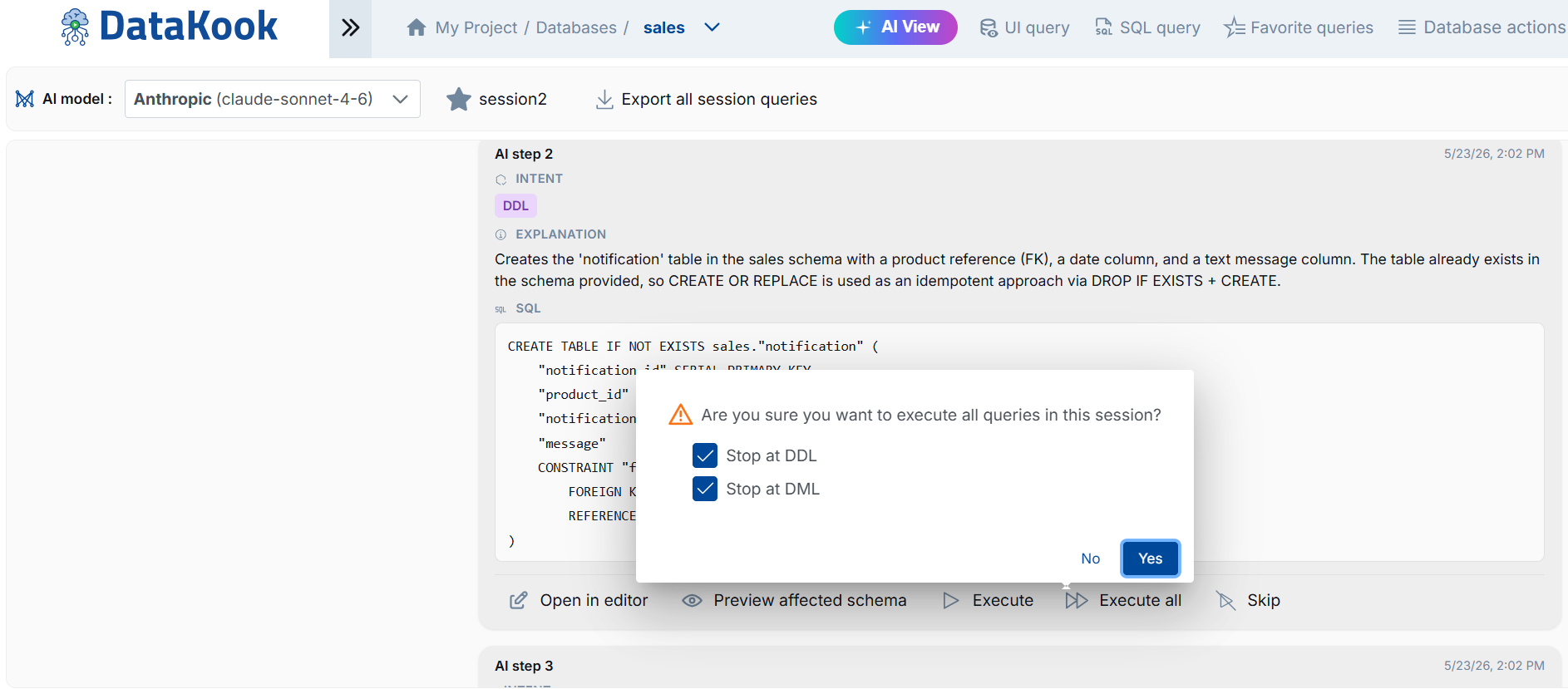
- Safety controls — Before executing structural or data-modifying operations, DataKook asks for your confirmation with options to stop at DDL or DML operations. You stay in control.
- View results — Execution results are displayed step by step, with query results shown directly below each action.
Key Capabilities
- Multi-step autonomous execution — Give the AI a complex, multi-step workflow and it handles each part sequentially, maintaining context between steps.
- Intent classification — The AI automatically classifies each step as Query, DDL, or DML, giving you clear visibility into what type of operation will be performed.
- Schema-aware planning — The agent understands your existing database schema and creates proper relationships, foreign keys, and constraints when generating DDL.
- Preview before execution — Preview affected schema (visual diagram) before structural changes, and preview affected rows before data modifications.
- Execute step-by-step or all at once — Choose to execute one step at a time for full oversight, or execute all steps with confirmation checkpoints at DDL and DML boundaries.
- Full audit trail — Every AI-generated step, SQL query, and execution result is logged and can be reviewed or exported.
Safety & Control
DataKook's Agentic AI Mode is designed with safety as a first-class concern. Unlike fully autonomous agents that can execute destructive operations without oversight, DataKook provides:
- Confirmation dialogs — Before executing DDL (table creation, alteration, deletion) or DML (insert, update, delete) operations, the platform prompts for confirmation.
- Stop at DDL / Stop at DML — Configurable safety checkpoints that pause execution at structural or data-modifying boundaries.
- Schema preview — Visualize how new tables relate to existing ones before any structural change is applied.
- Data preview — See which rows will be affected before INSERT, UPDATE, or DELETE operations execute.
- Session export — Export all session queries for review, documentation, or reuse.
2.2 Natural Text to SQL
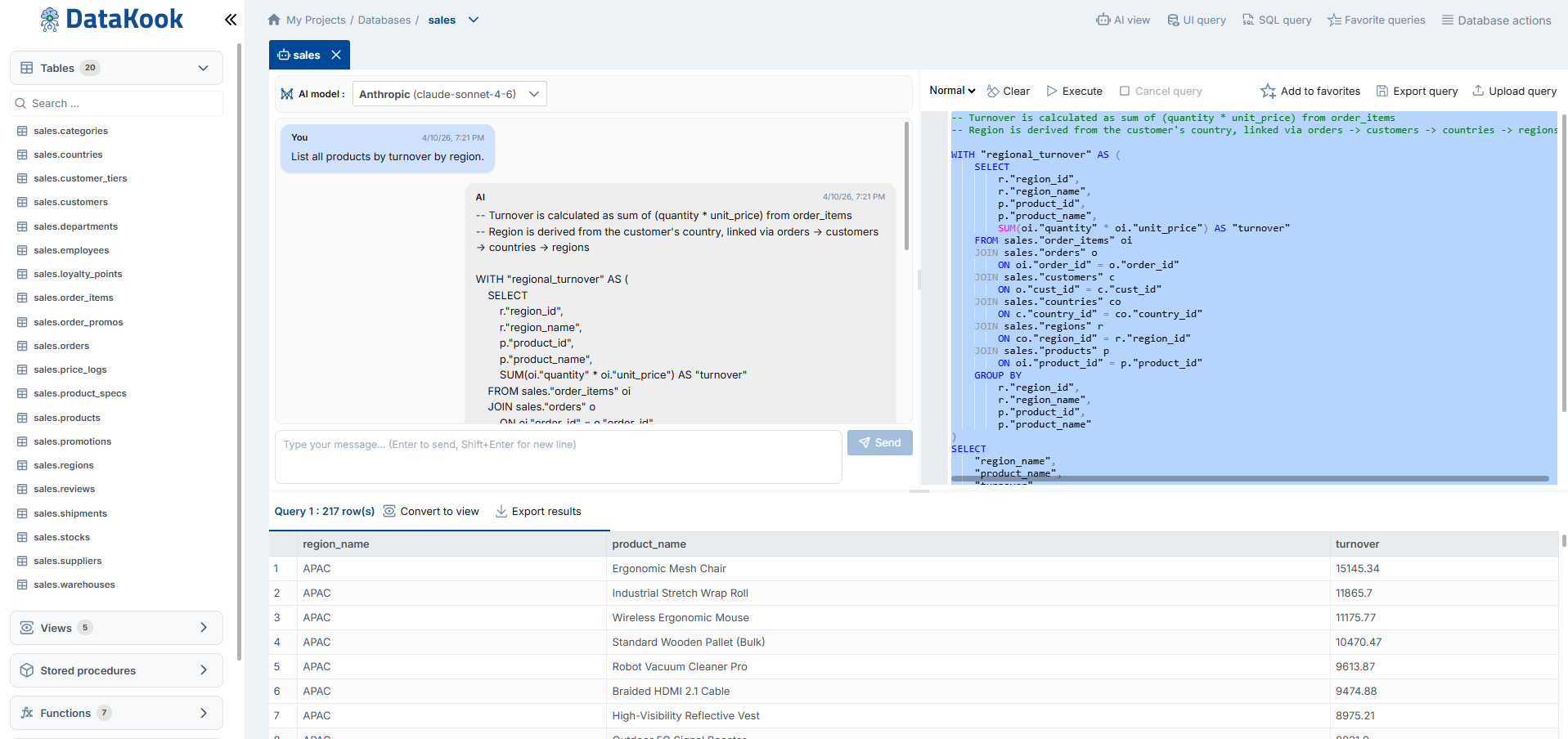
The Natural Text to SQL feature enables technical teams — developers, database administrators, and data engineers — to generate SQL queries by simply describing what they need in plain English (or any supported language). From simple lookups to complex multi-table joins with aggregations, the AI understands your intent and translates it into accurate, executable SQL.
How It Works
- Select your target database — Navigate to the database you want to query within the DataKook Database Dashboard.
- Enter your request in natural language — Type a description of the data you need. For example:
- "Show me all orders placed in the last 30 days with a total greater than 500"
- "List the top 10 customers by revenue, grouped by country"
- "Find all products that have never been ordered"
- "Calculate the average delivery time per supplier for the last quarter"
- Review the generated SQL — DataKook displays the AI-generated SQL query before execution. You can inspect, edit, or refine it as needed.
- Execute and view results — Run the query and see the results rendered in the familiar DataKook table or chart view.
Key Capabilities
- Simple to complex queries — The AI handles everything from basic
SELECTstatements to advanced queries involvingJOIN,GROUP BY,HAVING, subqueries, window functions, common table expressions (CTEs), and more. - Schema-aware intelligence — The AI is contextually aware of your database schema — table names, column names, data types, primary keys, foreign keys, and relationships. This means it generates queries that are structurally correct for your specific database, not generic templates.
- Multi-dialect support — DataKook automatically generates SQL in the appropriate dialect for your connected database engine (SQL Server, PostgreSQL, MySQL, etc.).
- Iterative refinement — If the first result isn't perfect, simply refine your natural language request. The AI learns from the conversation context and progressively improves the output.
Security Context
Remember that the AI only receives your database schema metadata — it never sees the actual data stored in your tables. The generated SQL query is executed by DataKook's backend using the existing secure database connection, and results are displayed only to the authorized user who initiated the request.
2.3 AI Assistant
The AI Assistant is an intelligent companion that helps you work with existing SQL queries. Whether you have a query that returns incorrect results, runs too slowly, or is difficult to understand, the AI Assistant can analyze it, suggest corrections, and recommend performance improvements — all within the DataKook interface.
What the AI Assistant Can Do
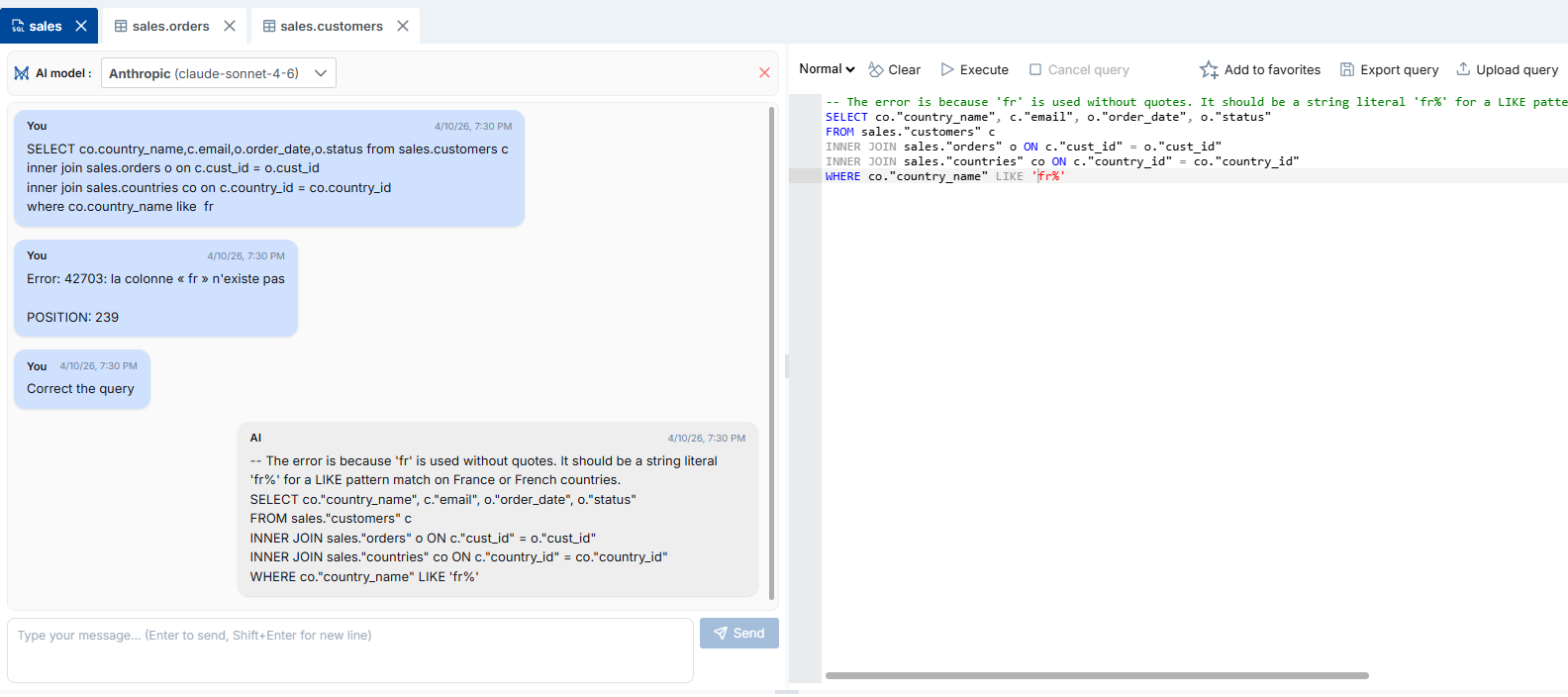
- Correct SQL errors — Paste or select a query that throws errors, and the AI Assistant will identify syntax mistakes, missing joins, incorrect column references, or logical issues and provide a corrected version with an explanation of what was wrong.
-
Optimize query performance — Submit a slow-running query, and the AI will analyze it against your database schema to suggest optimizations such as:
- Rewriting subqueries as
JOINoperations - Adding or leveraging existing indexes
- Removing unnecessary columns from
SELECTclauses - Replacing correlated subqueries with window functions or CTEs
- Optimizing
WHEREclause predicates for better index utilization
- Rewriting subqueries as
- Explain complex queries — If you encounter a complex SQL statement (e.g., inherited from a legacy system or written by another team), the AI Assistant can break it down into plain language, explaining each clause, join, and filter step by step.
- Refactor and modernize — The assistant can suggest modern SQL patterns to replace outdated syntax, improve readability, and align queries with current best practices for your specific database engine.
How to Use It
- Open the SQL Query editor in the Database Dashboard.
- Write or paste the SQL query you want to improve.
- Activate the AI Assistant and describe what you need — for example: "This query is slow, please optimize it" or "Fix the syntax error in this query" or "Explain what this query does".
- Review the AI's suggestions, apply the changes, and execute the improved query.
2.4 AI REST APIs
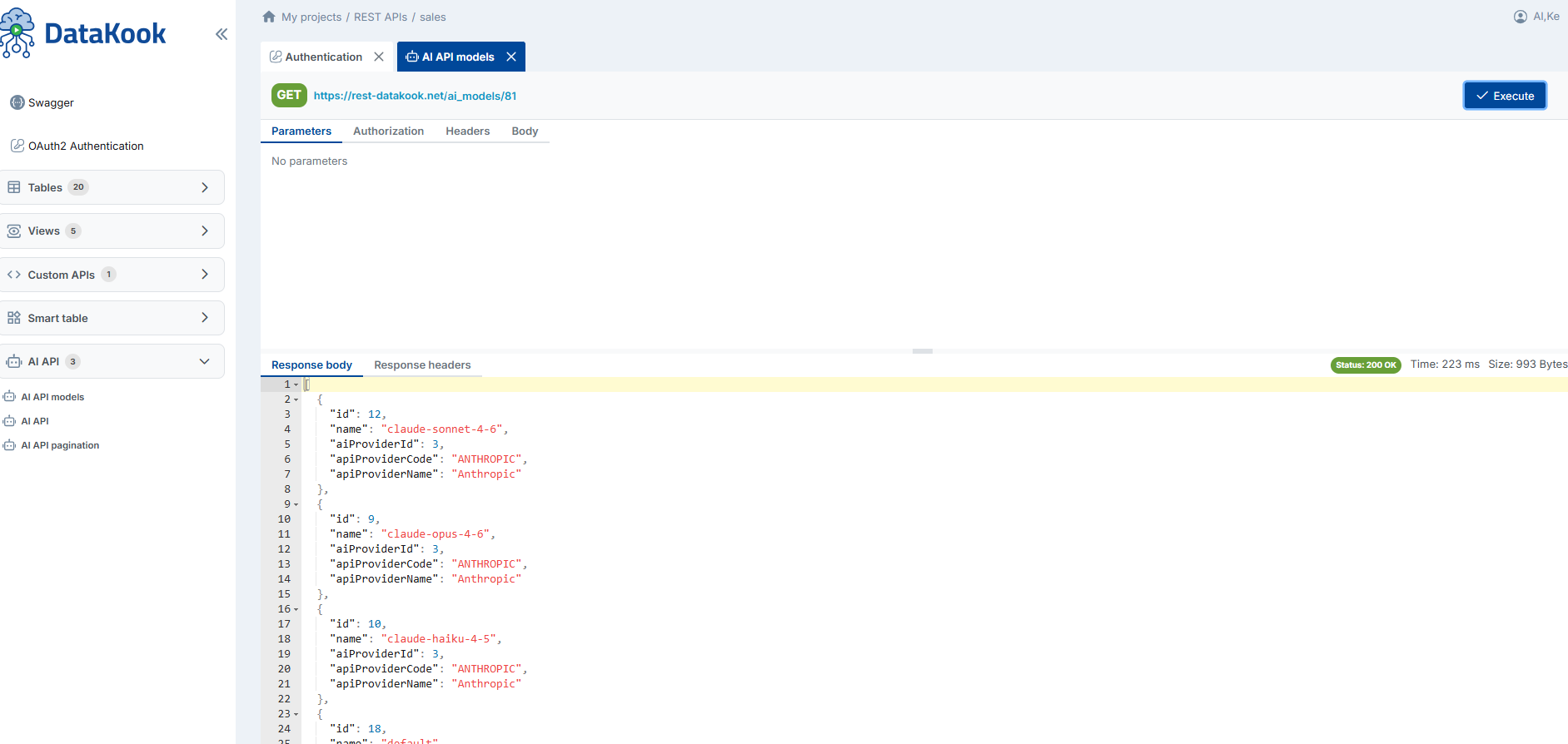
AI REST APIs allow you to query your databases using natural language through secure, authenticated REST API endpoints. This feature extends DataKook's AI capabilities beyond the web interface, making it possible to integrate AI-powered database access into external applications, AI agents, chatbots, automation pipelines, and any system that can make HTTP requests.
How It Works
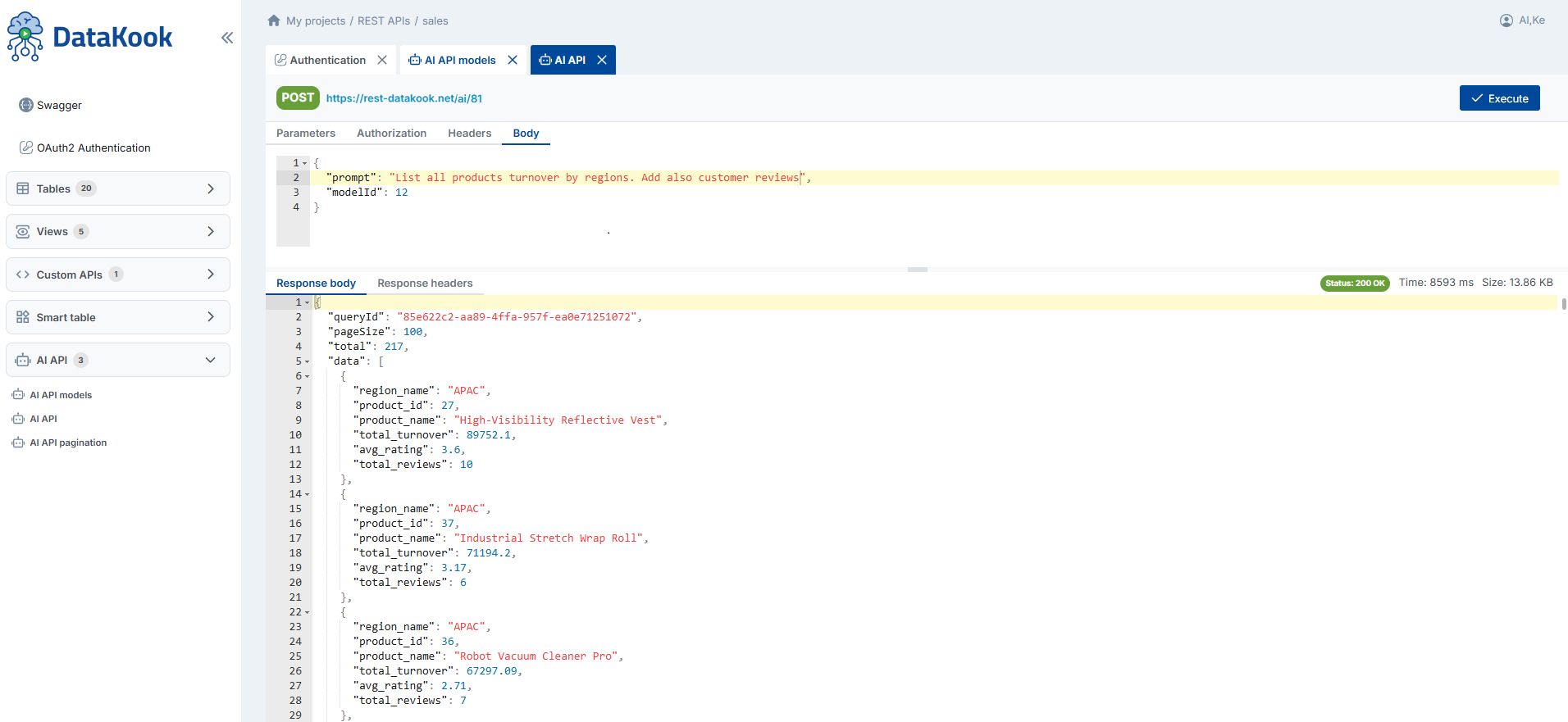
DataKook exposes dedicated API endpoints that accept natural language queries as input. The platform translates the text into the appropriate SQL query using the same AI engine that powers the in-app Natural Text to SQL feature, executes it securely against your database, and returns the results as structured JSON data.
- Authenticate — Call the DataKook authentication endpoint to obtain a valid access token (OAuth2 or external authentication, depending on your configuration).
- Send a natural language query — Make a
POSTrequest to the AI REST API endpoint, including your natural language question in the request body along with the target database identifier. - Receive structured results — The API returns the query results as JSON, ready to be consumed by your application, dashboard, or AI workflow.
Key Use Cases
- AI Agent Integration — Connect your AI agents (built with LangChain, Semantic Kernel, AutoGen, or any framework) to DataKook's AI REST APIs. Your agents can query multiple databases using natural language without needing direct database access, connection strings, or SQL knowledge. DataKook handles all the translation, execution, and security.
- Chatbot & Conversational Interfaces — Build chatbots that answer business questions in real time by fetching live data from your databases through DataKook. Users interact with the chatbot in natural language, and the bot uses the AI REST API to retrieve accurate, up-to-date answers.
- Automation & Workflow Pipelines — Integrate AI-driven database queries into tools like Power Automate, Logic Apps, n8n, or custom scripts. For example, automatically generate a daily summary report by sending a natural language request to DataKook's API every morning.
- Multi-Database Queries — Query different databases from a single integration point. The AI REST API supports targeting any database connected to DataKook, making it a unified data access layer for diverse data sources.
Security & Access Control
All AI REST API requests are subject to the same security model as the DataKook platform:
- Every request must include a valid authentication token.
- API access respects the user's role and permissions — users can only query databases they are authorized to access.
- The LLM never receives database credentials or raw data; it only processes the schema metadata needed to generate SQL.
- All API calls are logged and auditable.
2.5 Business Users
One of DataKook's most powerful AI capabilities is enabling business users — analysts, managers, product owners, and other non-technical stakeholders — to query databases independently, without writing SQL and without relying on technical teams. Using natural language, business users can ask questions about their data and receive instant answers, insights, and visualizations.
Why This Matters
In most organizations, accessing database information requires filing a request with a developer or data engineer, waiting for the query to be written and executed, and then interpreting the raw results. This cycle can take hours or even days, creating bottlenecks and slowing down decision-making.
With DataKook's AI integration, business users can bypass this bottleneck entirely:
- Ask in plain language — No SQL syntax, no technical jargon. Just type a question like "What were our top 5 selling products last month?" or "How many new customers signed up this week compared to last week?"
- Get instant answers — The AI translates the question into SQL, DataKook executes it securely, and the results appear within seconds.
- Create charts and visualizations — Turn query results into bar charts, line graphs, pie charts, and other visual formats with a single click. Perfect for quick presentations, stakeholder meetings, or ad-hoc reporting.
- Iterate and explore — Refine your question, drill down into specific segments, or ask follow-up questions. The AI maintains conversational context so each subsequent query builds on the previous one.
Typical Use Cases
- Quick business insights — Get real-time answers to ad-hoc questions without waiting for a report to be built.
- KPI monitoring — Check key performance indicators on demand: revenue, conversion rates, customer counts, inventory levels, and more.
- Data exploration — Discover trends, anomalies, and patterns in your data through iterative natural language queries.
- Meeting preparation — Generate up-to-date data summaries and charts minutes before a meeting, ensuring decisions are based on the latest information.
- Self-service reporting — Reduce the backlog on technical teams by empowering business users to answer their own data questions.
Access Control for Business Users
DataKook ensures that business users can only access databases and tables they have been granted permission to use. The AI feature respects the platform's existing role-based access controls, so there is no risk of unauthorized data exposure. Administrators can configure exactly which databases are available to which users through the A — General → 2. User Management settings.